







Details
Overview
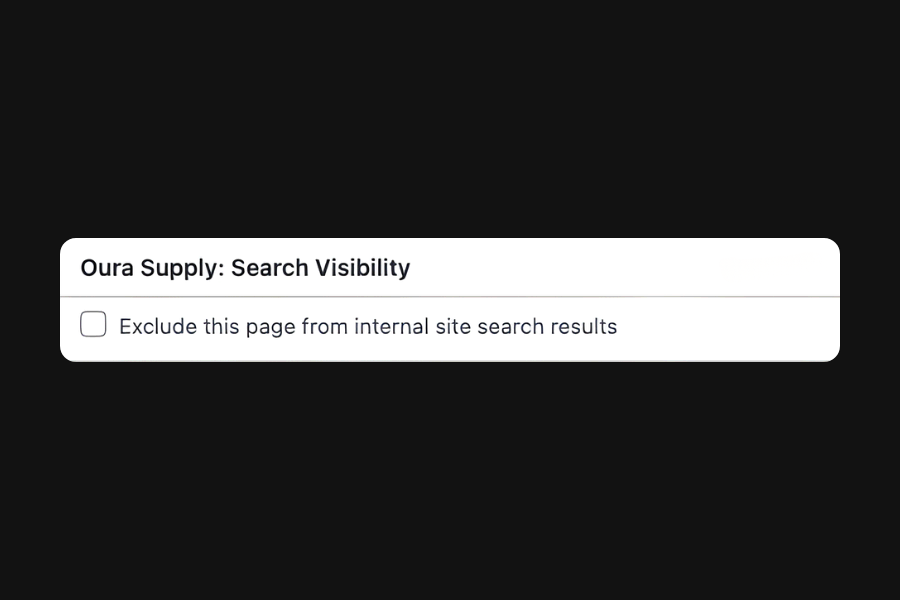
This snippet adds a toggle to all post types to control whether they appear in your site’s internal search results. The content stays public and accessible by direct link.
This is useful for hiding thank-you pages, private landing pages, or any content you want excluded from search results while still accessible via direct link.
Setup
Add External Scripts
Copy & paste the scripts before the </body> tag of your project. If you added them before for another setup, skip this step.
Add HTML
Place the code in an HTML widget or add it through Elementor → Custom Code (before the closing </body> tag) either globally or only on selected pages.
Add custom CSS
Paste the code through the page or site settings, or add it via Elementor → Custom Code (before </body>) for broader use.
Add custom Javascript
Paste the script through Elementor → Custom Code (set to load after </body>) for site-wide or page-specific loading.
Add custom PHP
Place the PHP snippet inside your theme’s functions.php or using any code snippet to enable logic.
function exclude_from_search_meta_box() {
  $post_types = get_post_types(
    [
      'public' => true
    ],
    'names'
  );

  foreach ($post_types as $post_type) {
    add_meta_box(
      'exclude_search',
      'Oura Supply: Search Visibility',
      'exclude_from_search_callback',
      $post_type,
      'normal',
      'default'
    );
  }
}
add_action('add_meta_boxes', 'exclude_from_search_meta_box');

function exclude_from_search_callback($post) {
  $value = get_post_meta($post->ID, '_exclude_from_search', true);
  ?>
  <label>
    <input type="checkbox" name="exclude_from_search" value="1" <?php checked($value, '1'); ?>>
    Exclude this page from internal site search results
  </label>
  <?php
}

function save_exclude_from_search($post_id) {
  if (defined('DOING_AUTOSAVE') && DOING_AUTOSAVE) return;
  if (wp_is_post_revision($post_id)) return;

  if (isset($_POST['exclude_from_search'])) {
    update_post_meta($post_id, '_exclude_from_search', '1');
  } else {
    delete_post_meta($post_id, '_exclude_from_search');
  }
}
add_action('save_post', 'save_exclude_from_search');

function exclude_pages_from_search($query) {
  if ($query->is_search() && !is_admin()) {
    $query->set('meta_query', [
      [
        'key' => '_exclude_from_search',
        'compare' => 'NOT EXISTS'
      ]
    ]);
  }
}
add_action('pre_get_posts', 'exclude_pages_from_search');Open your WordPress dashboard and edit the page, post, or custom post type you want to manage. Once inside the editor, scroll down past the main content area.
You will see a section titled “Oura: Internal Search Visibility”. This is where you control whether the page appears in your site’s internal search results.
- Enable "Exclude this page from internal site search results"
- Click
UpdateorPublishto save your changes
Publish and preview live
Some solutions only work on the live site. Always publish and test after each change, as results may not appear in the editor.